
Getting Started
One of the principles behind IGDB.com is accessibility of data. We wish to share the data with anyone who wants to build cool video game oriented websites, apps and services.
This means that you are not only contributing to the value of IGDB but to thousands of other projects as well. We are looking forward to see what exciting game related projects you come up with. Happy coding!
For a high level overview of our juicy data, check out the endpoints section.
Table of Contents
Account Creation
In order to use our API, you must have a Twitch Account.
- Sign Up with Twitch for a free account
- Ensure you have Two Factor Authentication enabled
- Register your application in the Twitch Developer Portal
- Manage your newly created application
- Generate a Client Secret by pressing [New Secret]
- Take note of the Client ID and Client Secret
The IGDB.com API is free for non-commercial usage under the terms of the Twitch Developer Service Agreement.
Authentication
Now that you have a Client ID and Client Secret you will be authenticating as a Twitch Developer using Oauth2.
Detailed information can be found in the Twitch Developer Docs.
Make a POST request to https://id.twitch.tv/oauth2/token with the following query string parameters, substituting your Client ID and Client Secret accordingly.
client_id=Client ID
client_secret=Client Secret
grant_type=client_credentials
Example
If your Client ID is abcdefg12345 and your Client Secret is hijklmn67890, the whole url should look like the following.
POST: https://id.twitch.tv/oauth2/token?client_id=abcdefg12345&client_secret=hijklmn67890&grant_type=client_credentials
The response from this will be a json object containing the access token and the number of second until the token expires.
{
					  "access_token": "access12345token",
					  "expires_in": 5587808,
					  "token_type": "bearer"
					}
Requests
- Most of the requests to the API will use the
POSTmethod - The base URL is: https://api.igdb.com/v4
-
You define which endpoint you wish to query by appending
/{endpoint name}to the base URL eg. https://api.igdb.com/v4/games -
Include your
Client IDandAccess Tokenin theHEADERof your request so that your headers look like the following.- Take special care of the capitalisation.
Bearershould be hard-coded infront of youraccess_token
- Take special care of the capitalisation.
Client-ID: Client ID
					Authorization: Bearer access_token
- You use the
BODYof your request to specify the fields you want to retrieve as well as any other filters, sorting etc
https://corsproxy.io/?https://api.igdb.com/v4 server above. USE AT YOUR OWN RISK as it is a third party proxy run by the people at corsproxy.io. Rate Limits
There is a rate limit of 4 requests per second. If you go over this limit you will receive a response with status code 429 Too Many Requests.
You are able to have up to 8 open requests at any moment in time. This can occur if requests take longer than 1 second to respond when multiple requests are being made.
Wrappers
Get setup quickly by using one of these wrappers!
Apicalypse
Third Party
Examples
It’s recommended to try out your queries in an API viewer like Postman or Insomnia before using code. This helps you find problems a lot sooner!
Postman setup example
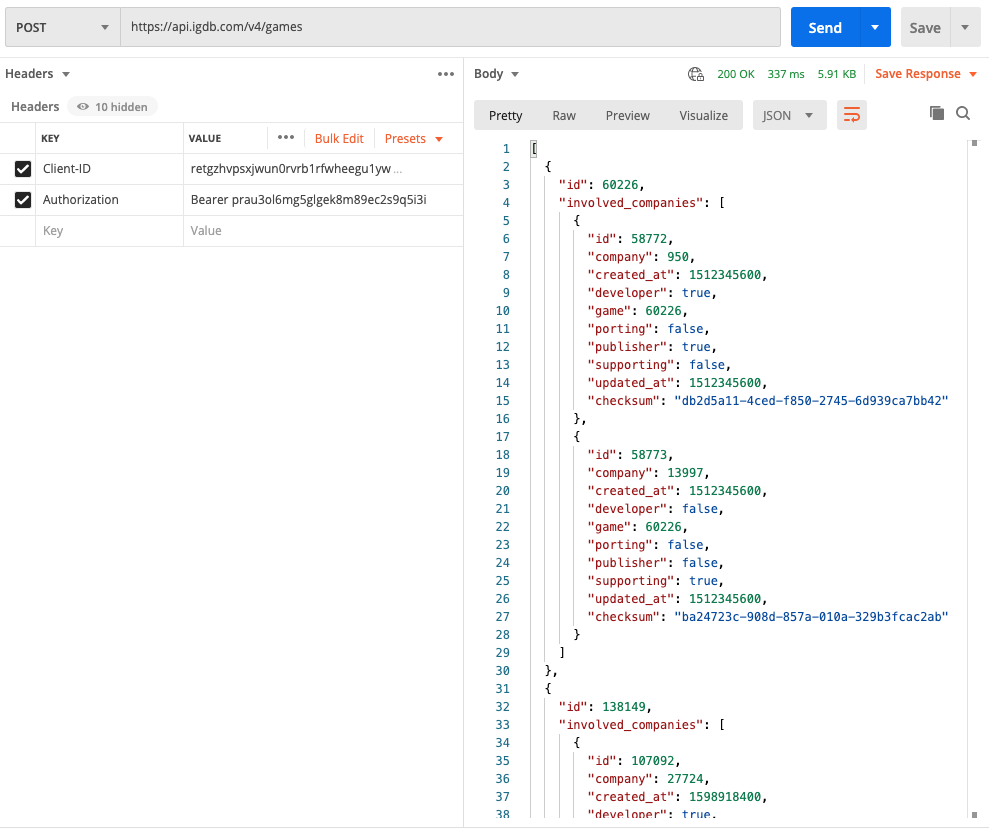
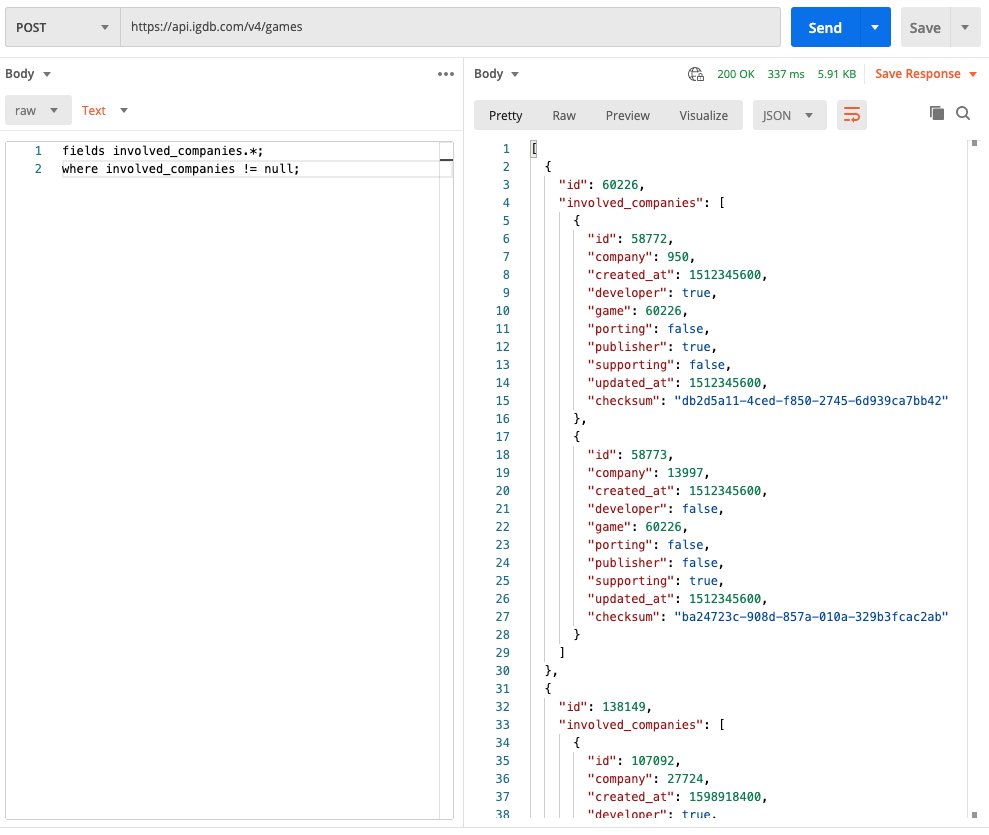
A very basic example to retrieve the name for 10 games.
https://api.igdb.com/v4/games/
fields name; limit 10;
Get all information from a specific game
1942, is the ID of a game.
https://api.igdb.com/v4/games/
fields *; where id = 1942;
Exclude irrelevant data from your query
Remove alternative_name from your result query
https://api.igdb.com/v4/platforms/
fields *;
exclude alternative_name;
Get all games from specific genres
Notice how you can comma separate multiple IDs (8, 9, and 11). You can do this with games, companies and anything else. Also note that when you have multiple IDs they have to be surrounded by a parenthesis. Single ids can be queried both with and without the parenthesis.
https://api.igdb.com/v4/genres/
fields *; where id = (8,9,11);
Count total games that have a rating higher than 75
https://api.igdb.com/v4/games/count
where rating > 75;
Order by rating
https://api.igdb.com/v4/games/
fields name,rating; sort rating desc;
Coming soon games for Playstation 4
https://api.igdb.com/v4/release_dates/
fields *; where game.platforms = 48 & date > 1538129354; sort date asc;
1538129354: Is the timestamp in milliseconds of 28/09/2018 (This you need to generate yourself) 48 Is the platform id of Playstation 4.
Recently released games for Playstation 4
fields *; where game.platforms = 48 & date < 1538129354; sort date desc;
Search, return certain fields.
https://api.igdb.com/v4/games/
search "Halo"; fields name,release_date.human;
https://api.igdb.com/v4/games/
fields name, involved_companies; search "Halo";
Search games but exclude versions (editions)
https://api.igdb.com/v4/games/
fields name, involved_companies; search "Assassins Creed"; where version_parent = null;
This will return search results with ID and name of the game but exclude editions such as “Collectors Edition”.
Searching all endpoints
The example below searches for “Sonic the Hedgehog” which will find the Character Sonic, the collection Soninc the Hedgehog. And of course also several games with names containing Sonic the Hedgehog.
https://api.igdb.com/v4/search
fields *; search "sonic the hedgehog"; limit 50;
Get versions (editions) of a game
https://api.igdb.com/v4/game_versions/
fields game.name,games.name; where game = 28540;
The resulting object will contain all games that are a version of the game with id 28540
Get the parent game for a version
https://api.igdb.com/v4/games/
fields version_parent.*; where id = 39047;
The resulting object will contain all main games
Get all games that are playstation 4 exclusives
fields name,category,platforms;
where category = 0 & platforms = 48;
Get all games that are only released on playstation 4 AND PC
fields name,category,platforms;
where category = 0 & platforms = {48,6};
Webhooks
What?
Webhooks allow us to push data to you when it is added, updated, or deleted. Instead of polling the API for changes, you can listen on your own HTTP endpoint (Webhook) and we will deliver the data to you.
Using Webhooks will ensure that your data is always up to date!
curl -X POST 'https://api.igdb.com/v4/ENDPOINT/webhooks/' \
						-d 'url=YOUR_WEBHOOK_URL&secret=YOUR_WEBHOOK_SECRET&method=create' \
						-H 'Client-ID: Client ID' \
						-H 'Authorization: Bearer access_token' \
						-H 'Content-Type: application/x-www-form-urlencoded'
How to register your webhook
To register a new webhook you need to send a POST request to ENDPOINT/webhooks. The endpoint is required as it specifies what type of data you want from your webhook.
The post request should contain x-www-form-urlencoded body with three parameters:
urlthis is your prepared url that is ready to accept data from us.-
methodthis is the type of data you are expecting to your url, there are three types of methodscreate, sends new items from the APIdelete, sends deleted items from the APIupdate, sends updated items from the API
secretthis is your “secret” password for your webhook. Every request from the webhook service will have your secret in the header calledX-Secret.
// Example response upon registering your webhook
						{
						    "id": WEBHOOK_ID, // A unique ID for the webhook
						    "url": "YOUR_WEBHOOK_URL", // Your chosen URL
						    "category": 1, // Based on the endpoint you chose
						    "sub_category": 0, // Based on your method (can be 0, 1, 2)
						    "active": true, // Is the webhook currently active
						    "api_key": "YOUR_CLIENT_ID", // Displays the api key the webhook is connected to
						    "secret": "YOUR_SECRET", // Your chosen secret
						    "created_at": "2018-11-25T23:00:00.000Z", // Created at date
						    "updated_at": "2018-11-25T23:00:00.000Z" // Updated at date
						}

Registering your webhook in Postman Once your webhook is registered you will receive a response with the new webhook object
// Delete Response from Webhook
						{
						  "id": "1234"
						}
That’s it!
The data will now be sent to your webhook in the body of a post request. The data is a single json object representing an unexpanded entity.
Webhooks from DELETE do not send the entire object but only the ID.
Webhooks have an active field, as you can see in the JSON response above, The service will keep the webhook active as long as the webhook url is capable of receiving data from the service. If the url fails 5 times the webhook will be set to inactive (active: false) and the service will stop to send data to this webhook.
Reactivating the webhook is done by re-registering it, this will update the active status to true.
Viewing your webhooks
You can always get information about your webhooks from the API. To get ALL of your registered webhooks simply send a GET request to /webhooks, without the endpoint. This will return a JSON array of your webhooks
To get information about a specific webhook you can make a GET request with the webhook id to /webhooks/WEBHOOK_ID, without the endpoint. This will return the webhook of that id.
# Get ALL registered Webhooks
						curl 'https://api.igdb.com/v4/webhooks/' \
						-H 'Client-ID: Client ID' \
						-H 'Authorization: Bearer access_token'
Viewing your webhooks
You can always get information about your webhooks from the API. To get ALL of your registered webhooks simply send a GET request to /webhooks, without the endpoint. This will return a JSON array of your webhooks
To get information about a specific webhook you can make a GET request with the webhook id to /webhooks/WEBHOOK_ID, without the endpoint. This will return the webhook of that id.
curl -X DELETE 'https://api.igdb.com/v4/webhooks/WEBHOOK_ID' \
-H 'Client-ID: Client ID' \
-H 'Authorization: Bearer access_token'
Removing a Webhook
To remove your existing webhook you need to send a DELETE request to /webhooks/WEBHOOK_ID, without the endpoint. The Webhook id is returned during the registration process or can be found with a GET request to /webhooks/.
The DELETE request will receive the deleted webhook as confirmation.
curl -X POST 'https://api.igdb.com/v4/ENDPOINT/webhooks/test/WEBHOOK_ID?entityId=ENTITY_ID' \
-H 'Client-ID: Client ID' \
-H 'Authorization: Bearer access_token'
Testing
To make sure you have everything setup just right we have a test endpoint for the webhook service. This endpoint will send an object of your choosing to your newly created webhook.
Send a POST request to ENDPOINT/webhooks/test/WEBHOOK_ID?entityId=ENTITY_ID. The entity id is the id of the object from the endpoint you wish to test with, example:
POST to games/webhooks/test/42?entityId=1337:
This request will send the game object with id 1337 to your webhook url.
Handling Webhooks on your end
When recieveing the webhook message on your end what we expect is to recieve a 200 OK back within 15 seconds. If the endpoint takes longer than 15 seconds to respond the event will be deemed as a failed event, fail 5 times and the webhook will be set to inactive.
CORS Proxy
CORS
If you intend to use our API from your website you will encounter an issue with security; namely CORS Cross-Origin Resource Sharing.
There are security mechanisms in place by all major browsers to stop websites from accessing other domains without getting explicit permission. This is done through HTTP headers. So, for example, amazinggameswebsite.com cannot access api.igdb.com without us explicitly stating in the HTTP headers (Access-Control-Allow-Origin) that they have permission.
We do not offer the configuration of these headers as a service, so any browser-based javascript and mobile javascript frameworks will not be able to communicate directly with the IGDB API.
Workaround
See the guide for setting up a proxy or set up a proxy using CORS Anywhere
Proxy
There are a number of reasons why you may wish to proxy requests to the IGDB API.
- To have a backend that keeps track of your Oauth Application Tokens
- Caching requests to the API for better performance
- Enable application logging to track/debug usage
- Enable CORS between the proxy and applications
How do I set up a proxy?
Proxies can be complex, but to get you started we have a simple guide to get you up and running quickly through AWS.
We have provided a single link that will let you deploy an AWS Api Gateway in your own AWS account that will serve as a proxy. This Stack will also handle your Access Token rotations automatically for you, so you don’t need to think about that.
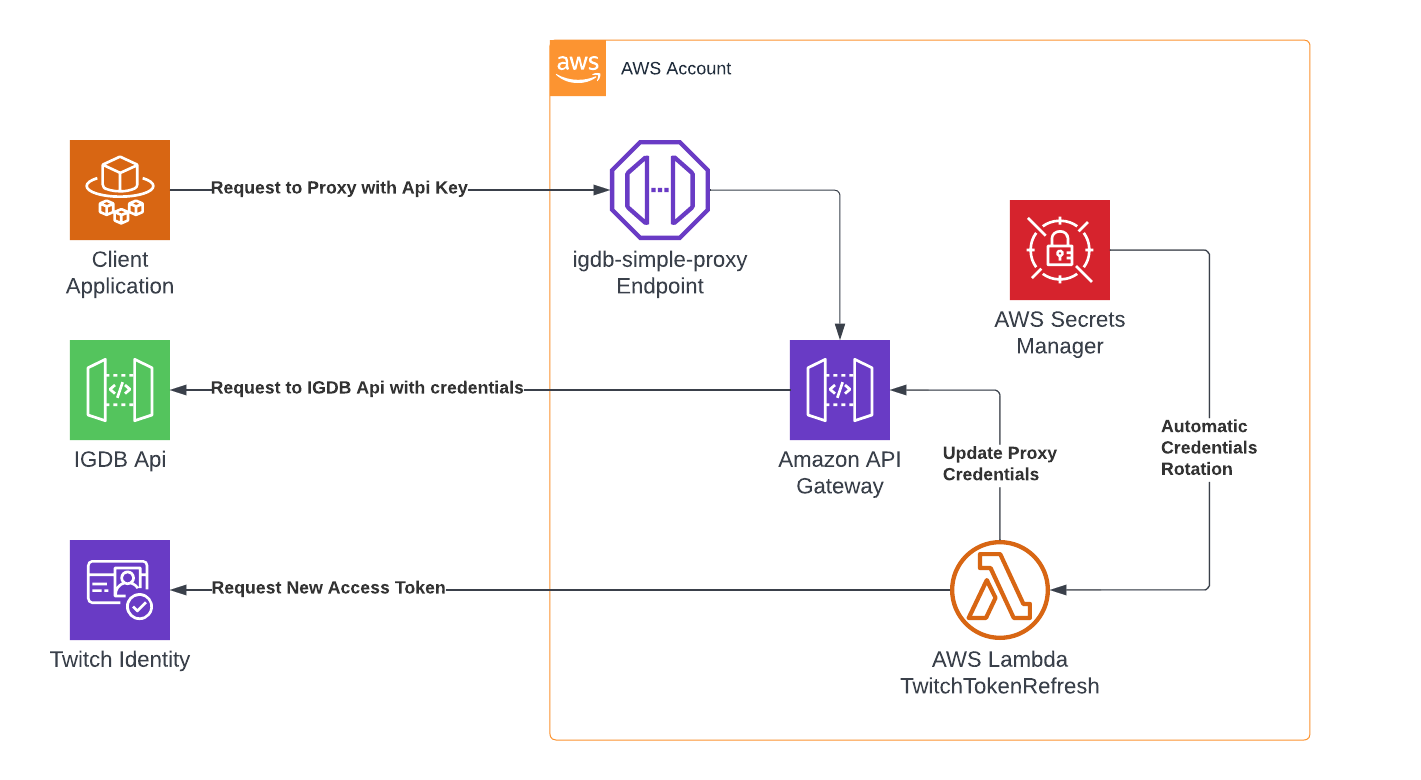
What will it cost?
AWS has a very generous free-tier for new users and the services used in the provided solution (Api Gateway, Secrets Manager, Lambda). Please use the AWS Pricing Calculator to gauge how much this will cost you before setting up your Stack.
Stack Setup
Prerequisites: You need to have an AWS account with permissions to deploy CloudFormation stacks.
- Click this link to get started.
-
Go over the Stack Details
- You have to agree to the terms and conditions.
- You have to fill in your Twitch Application Credentials
- It’s recommended to protect your proxy by enabling Api Keys
- NOTE: Enabling Caching will come with extra costs as this is NOT covered by the Free-tier
- NOTE: Enabling CORS will ‘break’ Protobuf responses, some libraries might not work.
- Click Next
- Configure Stack Options - Nothing is required here, you can click Next
- Verify Settings, click the checkbox at the bottom, then click “Create Stack”
- You will now see the “Stack Details” screen, hit the refresh arrow button on the right until your stack name on the left says “UPDATE_COMPLETE”
-
Click on the “Outputs” tab to get the URL to your new proxy.
- The “Resources” tab summarises all the services deployed on your account.
- The “Template” tab displays the template used for deployment.
-
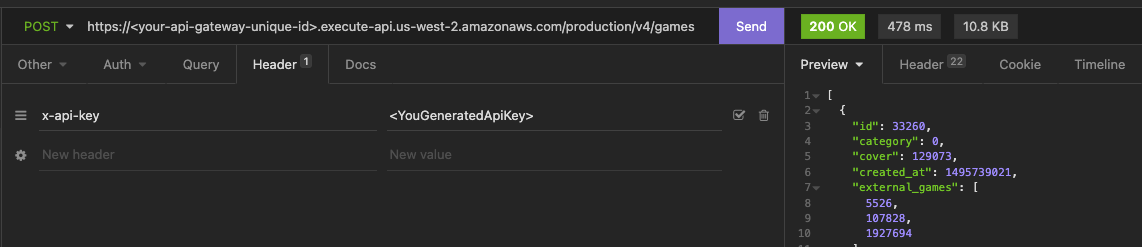
You can now post requests to your URL and it will proxy to our API
- If you enabled Api Keys you will need to specify the header
x-api-keyand the key can be found via a link through the “Resources” tab for “ApiDefaultKey”
- If you enabled Api Keys you will need to specify the header
Important Note: The url generated will end in production, so you will want to post to
https://<your-api-gateway-unique-id>.execute-api.us-west-2.amazonaws.com/production/v4/games
What’s next?
You can do a lot of things via API Gateway.
- You can improve the security of your proxy by creating another sort of Authentication, to prevent others from using up your RPS quota.
- You can also setup your own Domain name and SSL with Route53
-
You can modify the path of the proxy to have it serve as the front-end to your own APIs
- Perform a calculation? Lambda Integration
- Just want to store some records? DynamoDB Integration
- Want users to be able to upload/download files? S3 Integration
- Enable request logging
Alternatives
- CORS: Setup a proxy using CORS Anywhere
Reference
Images
Examples
-
Address:
https://api.igdb.com/v4/games/
-
Body:
-
fields screenshots.*;

											where id = 1942;
-
Here we retrieve the image properties of the game with the id “1942”
[{
							"id": 1942,
							"screenshots": [{
									"id": 9742,
									"game": 1942,
									"height": 1080,
									"image_id": "mnljdjtrh44x4snmierh",
									"url": "//images.igdb.com/igdb/image/upload/t_thumb/mnljdjtrh44x4snmierh.jpg",
									"width": 1920
								},
								{
									"id": 9743,
									"game": 1942,
									"height": 1080,
									"image_id": "em1y2ugcwy2myuhvb9db",
									"url": "//images.igdb.com/igdb/image/upload/t_thumb/em1y2ugcwy2myuhvb9db.jpg",
									"width": 1920
								}
							]
						}]
Image url structure:
https://images.igdb.com/igdb/image/upload/t_screenshot_med_2x/dfgkfivjrhcksyymh9vw.jpg
Break down:
https://images.igdb.com/igdb/image/upload/t_{size}/{hash}.jpg
size is one of the interchangeable size types listed below. hash is the id of the image. The image sizes are all maximum size but by appending _2x to any size, you can get retina (DPR 2.0) sizes (cover_small_2x).
| Name | Size | Extra |
|---|---|---|
| cover_small | 90 x 128 | Fit |
| screenshot_med | 569 x 320 | Lfill, Center gravity |
| cover_big | 264 x 374 | Fit |
| logo_med | 284 x 160 | Fit |
| screenshot_big | 889 x 500 | Lfill, Center gravity |
| screenshot_huge | 1280 x 720 | Lfill, Center gravity |
| thumb | 90 x 90 | Thumb, Center gravity |
| micro | 35 x 35 | Thumb, Center gravity |
| 720p | 1280 x 720 | Fit, Center gravity |
| 1080p | 1920 x 1080 | Fit, Center gravity |
Fields
What?
Fields are properties of an entity. For example, a Game field would be genres or release_dates. Some fields have properties of their own, for example, the genres field has the property name.
Where?
Fields can be used on any entity that has sub-properties such as Games, Companies, People etc.
How?
Fields are requested in a comma separated list. For example, to get some information for some Games, Genres, Themes or anything else, you could request it like this:
Apicalypse
where id = (4356,189,444);
fields name,release_dates,genres.name,rating
Legacy Parameters
/games/4356,189,444?fields=name,release_dates,genres.name,rating
Note in Apicalypse the name property of genres can be accessed directly with a dot (genres.name).
A full list of fields can be obtained by passing a * as a field. Alternatively you can use the meta postfix: /games/meta to get a list of all fields.
Shorthand
Another way of writing fields is to use the shorthand f which achieves the same result.
f name,release_dates,genres.name,rating;
w id = (4356,189,444);
Exclude
What?
Exclude is a complement to the regular fields which allows you to request all fields with the exception of any numbers of fields specified with exclude.
How?
Fields to be excluded are specified as a comma separated list. For example, to get all fields excpect for screenshots, you could request it like this:
Apicalypse
fields *;
exclude screenshots;
Shorthand
Another way of writing exclude is to use the shorthand x which achieves the same result.
f *;
x screenshots;
Expander
What?
Some fields are actually ids pointing to another endpoint. The expander feature is a convenient way to go into these other endpoints and access more information from them in the same query, instead of having to do multiple queries.
Where?
Expands are specificed among the regular fields in the body of the query.
How?
Fields can be expanded with a dot followed by the fields you want to access from a certain endpoint.
Examples
In the example below we request the fields name and genres for the game The Witcher 3 with id 1942.
fields name,genres;
where id = 1942;
But this query will only return ids for the genres, which can be seen in the first response to the right:
"First example response showing genre ids"
						[
						    {
						        "id ": 1942,
						        "genres":[
						            12,
						            31
						        ],
						        "name": "The Witcher 3: Wild Hunt"
						    }
						]
For some use cases the id is all that is needed, but other times more data is needed, This is when the expander features comes in handy.
fields name,genres.name;
where id = 1942;
This example with expander retrieves the name of each genre which can be seen in the second response to the right.
"Second example response showing genre ids and name"
						[
						    {
						        "id": 1942,
						        "genres": [
						            {
						                "id": 12,
						                "name": "Role-playing (RPG)"
						            },
						            {
						                "id": 31,
						                "name": "Adventure"
						            }
						        ],
						        "name": "The Witcher 3: Wild Hunt"
						    }
						]
And lastly lets take a look at how you can use a wildcard character * to retrieve all data from genres in the previous example.
fields name,genres.*;
where id = 1942;
See the third response to the right where all available data for each genre is included in the response.
"Third example response showing all available genre data"
						[
						    {
						        "id": 1942,
						        "genres": [
						            {
						                "id": 12,
						                "created_at": 1297555200,
						                "name": "Role-playing (RPG)",
						                "slug": "role-playing-rpg",
						                "updated_at": 1323216000,
						                "url": "https://www.igdb.com/genres/role-playing-rpg"
						            },
						            {
						                "id": 31,
						                "created_at": 1323561600,
						                "name": "Adventure",
						                "slug": "adventure",
						                "updated_at": 1323561600,
						                "url": "https://www.igdb.com/genres/adventure"
						            }
						        ],
						        "name": "The Witcher 3: Wild Hunt"
						    }
						]
Filters
What?
Filters are used to sift through results to get what you want. You can exclude and include results based on their properties. For example you could remove all Games where the rating was below 80 (where rating >= 80).
How?
Filters are parameter arrays so must be added using special keys like this:
-
Address:
https://api.igdb.com/v4/games/
-
Body:
-
search “zelda”;

											where rating >= 80 & release_dates.date > 631152000;
-
Where?
Filters can be used on any entity that has sub-properties such as Games, Companies, People etc.
Available Postfixes
=Equal: Exact match equal.!=Not Equal: Exact match equal.>Greater than (works only on numbers).>=Greater than or equal to (works only on numbers).<Less than (works only on numbers).<=Less than or equal to (works only on numbers).= "Your input string"*Prefix: Exact match on the beginning of the string, can end with anything. (Case sensitive).~ "Your input string"*Prefix: Exact match on the beginning of the string, can end with anything. (Case insensitive).= *"Your input string"Postfix: Exact match at the end of the string, can start with anything. (Case sensitive).~ *"Your input string"Postfix: Exact match at the end of the string, can start with anything. (Case insensitive).= *"Your input string"*Infix Exact match in the middle of the string, can start and end with anything. (Case sensitive).~ *"Your input string"*Infix Exact match in the middle of the string, can start and end with anything. (Case insensitive).!= nullThe value is not null.= nullThe value is null.[V1,V2,...Vn]The value exists within the (comma separated) array (AND between values).![V1,V2,...Vn]The values must not exist within the (comma separated) array (AND between values).(V1,V2,...Vn)The value has any within the (comma separated) array (OR between values).!(V1,V2,...Vn)The values must not exist within the (comma separated) array (OR between values).{V1,V2,...V2}Exact match on arrays. (Does not work on ids, strings, etc).
Examples
Filter by multiple platforms
To get games that are released on PS4 OR XBOX ONE OR PC
-
Address:
https://api.igdb.com/v4/games/
-
Body:
-
fields name;

											where release_dates.platform = (48,49,6);
-
Similarly if you want games released on PS4 AND XBOX ONE AND PC
-
Address:
https://api.igdb.com/v4/games/
-
Body:
-
fields name;

											where release_dates.platform = [48,49,6];
-
If you want games released only on PC
-
Address:
https://api.igdb.com/v4/games/
-
Body:
-
fields name;

											where release_dates.platform = 6;
-
And if you want games released for PC OR any other platform
-
Address:
https://api.igdb.com/v4/games/
-
Body:
-
fields name;

											where release_dates.platform = (6);
-
Combining Multiple Filters
It is possible to to use logical operators between filters, which could look something like this:
-
Address:
https://api.igdb.com/v4/games/
-
Body:
-
fields name,platforms,genres.name;

											where (platforms = [6,48] & genres = 13) | (platforms = [130,48] & genres = 12);
-
The response from this example query will be games that fulfil one or both of two sets or requirements:
- Games released for for both PC (6), and PS4 (48) and also has the genre simulator (13).
- Games released for for both Switch (130), and PS4 (48) and also has the genre Role-Playing (13).
Prefix, Postfix and Infix
Prefix
Filtering for game names beginning with “Super” (this will return games such as for example Super Mario World)
-
Address:
https://api.igdb.com/v4/games/
-
Body:
-
fields name;

											where name = "Super"*;
-
Postfix
Filtering for game names ending with with “World” (this will also return games such as for example Super Mario World)
-
Address:
https://api.igdb.com/v4/games/
-
Body:
-
fields name;

											where name = *"World";
-
Infix
Filtering for game names containing the string “Smash” anywhere (this will return games such as for example Super Smash Bros)
-
Address:
https://api.igdb.com/v4/games/
-
Body:
-
fields name;

											where name = *"Smash"*;
-
case insensitive version
Filtering for game names containing the string “Smash” (this will return games such as for example Super Smash Bros)
-
Address:
https://api.igdb.com/v4/games/
-
Body:
-
fields name;

											where name ~ *"Smash"*;
-
Removing erotic games from API responses
Some queries may return games with erotic themes. All erotic games in the database has the theme ’erotic’ (id = 42). So by adding a simple filter like the one below you can remove them from your responses.
-
Address:
https://api.igdb.com/v4/games/
-
Body:
-
fields name;

											where themes != (42);
-
Sorting
What?
Sorting is used to order results by a specific field.
How?
You can order results like this:
-
Address:
https://api.igdb.com/v4/games/
-
Body:
-
sort release_dates.date desc;

											where rating >= 80;
-
Notice the appended :desc (descending) which could also be :asc (ascending) if required.
Order by rating
Rating parameter for games. You can access it like this:
-
Address:
https://api.igdb.com/v4/games/
-
Body:
-
fields name,rating;

											sort rating desc;

											where rating != null;
-
Where?
Ordering can be used on any entity.
Search
What?
Search based on name, results are sorted by similarity to the given search string.
Where?
Searchable endpoints:
- Characters
- Collections
- Games
- People
- Platforms
- Themes
How?
You specify which endpoint to search through in the Address field of your request. The search string is then entered in the body of the request by typing search, blank space followed by the string you wish to search for.
-
Address:
https://api.igdb.com/v4/games/
-
Body:
search “zelda”;
Pagination
Here is an example for how to use limit. The default limit is 10. The maximum value you can set for limit is 500.
-
Address:
https://api.igdb.com/v4/platforms/
-
Body:
limit 33;
There is also an offset. This will start the list at position 22 and give 33 results.
-
Address:
https://api.igdb.com/v4/platforms/
-
Body:
-
limit 33;

											offset 22;
-
Protocol Buffers
Google Protocol Buffers is a language neutral method for serializing structured data.
The IGDB API supports responses in this format so you do not have to write your own serialization libraries, but instead you could just generate one.
Since this is langage neutral it is supported by a variatey of languages.
How?
Generate the objects in your language of choise with our own Protobuf file, here
This file contains the mapping of the entire IGDB API and can be used to generate wrappers, code and tooling in any programming language.
The protobuf file is created in accordance with the proto3 specification
There are plenty of examples on how to do this Online and on the Protobuf Site.
Where?
To start recieving protobuf compatible responses from then api all you need to do is add .pb at the end of your request:
https://api.igdb.com/v4/games.pb
Then use your generated files to parse the response into the expected object.
Tag Numbers
Tag numbers are automatically generated numbers which provide a compact and fast way to do complex filtering on the IGDB API. The number calculation can be easily achieved with any programming language.
The basis of the calculation is a 32bit integer, where the first 4 bits contain the object type ID, and the remaining 28 bits represent the ID of the object we are generating the tag number for.
Using this method a flat index of custom object ‘hashes’ can be maintained in which index the search and filtering is faster than using conventional methods.
Currently the following object types use tags:
| Type ID | Name |
|---|---|
| 0 | Theme |
| 1 | Genre |
| 2 | Keyword |
| 3 | Game |
| 4 | Player Perspective |
Let’s see two examples for tag number calculation.
// Javascript
const genreTypeID = 1; // The type ID from the table above
const shooterGenreID = 5; // The Shooter genre's ID, coming from the genres endpoint.
let tagNumber = genreTypeID << 28; // Bit-shifting the genre's type ID by 28 bits, ensuring that it will get into the first four bits. The result will be 268435456
tagNumber |= shooterGenreID; // Adding the Shooter genre ID to the tag number with a bitwise OR operation. The result will be 268435461.
We try to find all the games which relate to the Shooter genre. The tag number generation in Javascript would look something like the example on the right.
Javascript example query:
-
Address:
https://api.igdb.com/v4/games/
-
Body:
-
where tags = (268435461);
-
# Python
keywordTypeID: 2 # The keyword's type ID from the table above/
keywordID: 148 # The ID of the 'moba' keyword
tagNumber: keywordTypeID << 28 # Bit-shifting the keywords's type ID by 28 bits, ensuring that it will get into the first four bits. The result will be 536870912
tagNumber |= keywordID # Adding the keyword ID to the tag number with a bitwise OR operation. The result will be 536871060.
Python example query:
-
Address:
https://api.igdb.com/v4/games/
-
Body:
-
where tags = (536871060);
-
Multi-Query
Multi-Query is a new way to request a huge amount of information in one request! With Multi-Query you can request multiple endpoints at once, it also works with multiple requests to a single endpoint as well.
A Multi-Query is made by making a POST request to: https://api.igdb.com/v4/multiquery.
Syntax Structure The Multi-Query syntax is made up of three pieces; “Endpoint name”, “Result Name (Given by you)”, and the APICalypse query inside the body {}.
important You can only run a maximum of 10 queries.
Example 1:
Get the count of platforms in the api.
query platforms/count "Count of Platforms" {
  // here we can have additional filters
};
This above query will give us the following result:
[
  {
    "name": "Count of Platforms",
    "count": 155
  }
]
Example 2:
Get Playstation 4 Exclusives
query games "Playstation Games" {
	fields name,platforms.name;
	where platforms !=n & platforms = {48};
	limit 1;
};
This above query will give us the following result:
[
    {
        "name": "Playstation Games",
        "result": [
            {
                "id": 52826,
                "name": "Skate 4",
                "platforms": [
                    {
                        "id": 48,
                        "name": "PlayStation 4"
                    }
                ]
            }
        ]
    }
]
Example 3:
Combining the queries of example 1 and 2.
query platforms/count "Count of Platforms" {
  // here we can ahve additional filters
};

query games "Playstation Games" {
	fields name,platforms.name;
	where platforms !=n & platforms = {48};
	limit 1;
};
[
    {
        "name": "Count of Platforms",
        "count": 155
    },
    {
        "name": "Playstation Games",
        "result": [
            {
                "id": 52826,
                "name": "Skate 4",
                "platforms": [
                    {
                        "id": 48,
                        "name": "PlayStation 4"
                    }
                ]
            }
        ]
    }
]
APICalypse
APICalypse cheatsheet
APICalypse is a new language used for this api which greatly simplifies how you can query your requests compared to the url parameters used in API V2.
Fields
Fields are used to select which fields you want back from your request to the api.
To select fields you need the APICalypse command fields or its shorthand f.
Popular wildcard is to add * instead of a field, this will give you all of the fields.
fields name,release_dates,genres.name,rating;
f name,release_dates,genres.name,rating;
Exclude
Commonly used with selecting all fields with the wildcard * this command will exclude the fields that you select.
To exclude fields you don’t need the APICalypse command exclude or its shorthand x.
fields *;
exclude tags,keywords;
f *;
x tags,keywords;
Where
Where is easiest described as a filter. With where you can filter on specific fields.
To filter your results use the APICalypse command where or its shorthand w.
fields *;
where genres = 4;
f *;
w genres = 4;
Limit
Limit describes how many results you will get back from the api, the standard value is 10.
To set a new limit use the APICalypse command limit or it’s shorthand l.
fields *;
limit 50;
f *;
l 50;
Offset
Offset describes how many results you will skip over, standard is 0.
To set a new offset use the APICalypse command offset or it’s shorthand o.
Offset is often used together with Limit for pagination.
limit 50;
offset 50;
l 50;
o 50;
Sort
Use Sort to order the results to your liking.
To order the results use the APICalypse command sort or it’s shorthand s.
Sort has two accompaning commands for “direction”; asc Ascending order and desc Decending order.
fields *;
sort rating asc;
f *;
s rating desc;
Search
To find a specific title you can use Search.
To use search use the APICalypse command search, it has no shorthand :(. Search has it’s own endpoint where it is good to use a filter for specific kinds of results, example where game != null; for only games.
search "Halo";
fields name;
search "Halo";
f name;
Other shorts
Null can be written null or n. Booleans can be written as true or t and false or f
Partnership
Interested about using the API for a commercial project? No problem, we allow commercial usage. Get in touch with us about our partner program!
How?
To register for a commertial agreement reach out to [email protected]
Exclusive Features
Automatic data dumps every 24 hours.
More features coming soon.
Data Dumps
All endpoints are available as CSV Data Dumps!
Daily updated CSV Data Dumps which can be used to kick start your projects or keep your data up to date (within 24 hours).
curl -X GET 'https://api.igdb.com/v4/dumps' \
-H 'Client-ID: Client ID' \
-H 'Authorization: Bearer access_token'
Listing dumps
To list the available data dumps make a GET request to /dumps.
This will return a list of available Data Dumps describing the endpoint, file name, and updated at.
# Example response from /dumps
[
    {
		"endpoint": "games",
		"file_name": "1234567890_games.csv",
		"updated_at": 1234567890
	}
]
curl -X GET 'https://api.igdb.com/v4/dumps/ENDPOINT' \
-H 'Client-ID: Client ID' \
-H 'Authorization: Bearer access_token'
Downloading CSV
To get the download link for the csv files make a GET request to /dumps/ENDPOINT The response object will contain the download link for the CSV and the schema version & schema JSON structure of the data.
S3 Download Url:
The download Url is a presigned S3 url that is valid for 5 minutes.
Schema
The schema_version and schema will reflect the current data structure and data type that the Dump is using.
The schema version number will change when the schema changes, so if you are planning on an automated setup for this you will need to keep this in mind.
# Example response from /dumps/games
{
	"s3_url": "S3_DOWNLOAD_URL",
	"endpoint": "games",
	"file_name": "1234567890_games.csv",
	"size_bytes": 123456789,
	"updated_at": 1234567890,
	"schema_version": "1234567890",
	"schema": {
		"id": "LONG",
		"name": "STRING",
		"url": "STRING",
        "franchises": "LONG[]",
        "rating": "DOUBLE",
        "created_at": "TIMESTAMP",
        "checksum": "UUID",
	}
}
FAQ
Business related FAQ
1. I want to use the API for a commercial project, is it allowed?
Yes, we offer commercial partnerships for users looking to integrate the API in monetized products. From our side, as part of the partnership, we ask for user facing attribution to IGDB.com from products integrating the IGDB API.
For more details on that process, please reach out to [email protected]
2. What is the price of the API?
The API is free for both non-commercial and commercial projects.
3. Am I allowed to store/cache the data locally?
Yes. In fact, we prefer if you store and serve the data to your end users. You remain in control over your user experience, while alleviating pressure on the API itself.
4. Regarding user facing attribution (relating to the commercial partnership), any specific guidelines?
Not really. We expect fair attribution, i.e. attribution that is visible to your users and located in a static location (e.g. not in a change log).
5. What happens with the data retrieved, in the case of partnership termination?
You are allowed to keep all data you retrieve from the API and we will not ask you to remove the data in case of partnership termination.
6. We don’t wish to attribute IGDB.com as part of the partnership. Are there any other way?
Yes. If you have data that we think will complete the overall IGDB data set and you are willing to share that data with us, we can opt for this approach instead. Please be aware, however, that we are only interested in publicly available data that we can re-distribute using this API.
Technical related FAQ
1. Can I use Twitch User Credentials to access the API?
The IGDB API uses Application Credentials to authenticate, you cannot use user credentials to authenticate API requests
More information about authentication can be found in the documentation, here
2. The requested images are in the wrong format!
Requesting images using the API returns a default image url using the t_thumb format. To request larger image sizes you should manually create your own image url using the image_id and the appropriate image size. example: https://images.igdb.com/igdb/image/upload/t_{size}/{image_id}.png
More information about images and image sizes can be found in our documentation, here
3. Why am I recieving a CORS error?
The IGDB API does not support browser requests, CORS, for security reasons. This is because the request would leak your access token! We suggest that you create a backend proxy which authenticates and queries the API directly, and can be set up as a trusted connection for your client application.
For more information see our documentation, here
4. My AccessToken stopped working, why?
Your Access Token is only active for 60 days and your application can only have 25 active Access Tokens at one time, going over this limit starts to inactivate older tokens.
5. Why am I only receiving IDs?
An empty request will only yield a list of IDs. To request more information in a single request you should expand your request.
Ex: fields *, cover.*;
More information about expanding requests, here
More example requests, here
6. Why am I only receiving 10 items, how do I get more?
The default item limit is set to 10. To edit this limit simply specify the limit in your request.
Ex: limit 50;
The maximum limit is set to 500 items/request.
Read more about query syntax, here
7. How can I retrieve Popular Games?
Currently there is no popularity endpoint or popularity field on the game. The main reason is because popularity is quite vague since they can be many different ways to order/define popularity.
It used to be in v3 however we were not confident enough on the data so it was not moved on the V4 version.
Furthermore, the popular games you can see in IGDB.com homepage is specifically within the context of the website. Popularity is different in different context.
Support
Have a question?
If you have any questions about the API we recommend that you join our Discord, there you can discuss the API with other people working with it as well as the developers of the API and ask questions.
Reporting a bug
If you would like to report a bug with the API itself you can do so in Discord or use Uservoice
License
Any code examples or snippets found under api-docs.igdb.com are made available under the Twitch Developer Services Agreement as Program Materials.